- TypeScript 68.6%
- Rust 26%
- JavaScript 3.4%
- CSS 1%
- Python 0.5%
- Other 0.4%
| Filename | Latest commit message | Latest commit date |
|---|---|---|
 637f4e3201
Bumps the dev-tooling group with 6 updates: | Package | From | To | | --- | --- | --- | | [@biomejs/biome](https://github.com/biomejs/biome/tree/HEAD/packages/@biomejs/biome) | `2.5.14` | `2.5.15` | | [@types/node](https://github.com/DefinitelyTyped/DefinitelyTyped/tree/HEAD/types/node) | `26.6.3` | `26.6.4` | | [@typescript-eslint/parser](https://github.com/typescript-eslint/typescript-eslint/tree/HEAD/packages/parser) | `8.70.1` | `8.71.0` | | [eslint](https://github.com/eslint/eslint) | `10.11.0` | `10.12.0` | | [typescript-eslint](https://github.com/typescript-eslint/typescript-eslint/tree/HEAD/packages/typescript-eslint) | `8.70.1` | `8.71.0` | | [vitest](https://github.com/vitest-dev/vitest/tree/HEAD/packages/vitest) | `5.0.2` | `5.0.3` | Updates `@biomejs/biome` from 2.5.14 to 2.5.15 - [Release notes](https://github.com/biomejs/biome/releases) - [Changelog](https://github.com/biomejs/biome/blob/main/packages/@biomejs/biome/CHANGELOG.md) - [Commits](https://github.com/biomejs/biome/commits/@biomejs/biome@2.5.15/packages/@biomejs/biome) Updates `@types/node` from 26.6.3 to 26.6.4 - [Release notes](https://github.com/DefinitelyTyped/DefinitelyTyped/releases) - [Commits](https://github.com/DefinitelyTyped/DefinitelyTyped/commits/HEAD/types/node) Updates `@typescript-eslint/parser` from 8.70.1 to 8.71.0 - [Release notes](https://github.com/typescript-eslint/typescript-eslint/releases) - [Changelog](https://github.com/typescript-eslint/typescript-eslint/blob/main/packages/parser/CHANGELOG.md) - [Commits](https://github.com/typescript-eslint/typescript-eslint/commits/v8.71.0/packages/parser) Updates `eslint` from 10.11.0 to 10.12.0 - [Release notes](https://github.com/eslint/eslint/releases) - [Commits](https://github.com/eslint/eslint/compare/v10.11.0...v10.12.0) Updates `typescript-eslint` from 8.70.1 to 8.71.0 - [Release notes](https://github.com/typescript-eslint/typescript-eslint/releases) - [Changelog](https://github.com/typescript-eslint/typescript-eslint/blob/main/packages/typescript-eslint/CHANGELOG.md) - [Commits](https://github.com/typescript-eslint/typescript-eslint/commits/v8.71.0/packages/typescript-eslint) Updates `vitest` from 5.0.2 to 5.0.3 - [Release notes](https://github.com/vitest-dev/vitest/releases) - [Changelog](https://github.com/vitest-dev/vitest/blob/main/docs/releases.md) - [Commits](https://github.com/vitest-dev/vitest/commits/v5.0.3/packages/vitest) --- updated-dependencies: - dependency-name: "@biomejs/biome" dependency-version: 2.5.15 dependency-type: direct:development update-type: version-update:semver-patch dependency-group: dev-tooling - dependency-name: "@types/node" dependency-version: 26.6.4 dependency-type: direct:development update-type: version-update:semver-patch dependency-group: dev-tooling - dependency-name: "@typescript-eslint/parser" dependency-version: 8.71.0 dependency-type: direct:development update-type: version-update:semver-minor dependency-group: dev-tooling - dependency-name: eslint dependency-version: 10.12.0 dependency-type: direct:development update-type: version-update:semver-minor dependency-group: dev-tooling - dependency-name: typescript-eslint dependency-version: 8.71.0 dependency-type: direct:development update-type: version-update:semver-minor dependency-group: dev-tooling - dependency-name: vitest dependency-version: 5.0.3 dependency-type: direct:development update-type: version-update:semver-patch dependency-group: dev-tooling ... Signed-off-by: dependabot[bot] <support@github.com> Co-authored-by: dependabot[bot] <49699333+dependabot[bot]@users.noreply.github.com> |
||
| .github | ||
| docs | ||
| native | ||
| scripts | ||
| src | ||
| test | ||
| .gitattributes | ||
| .gitignore | ||
| .mise.toml | ||
| biome.json | ||
| CONTRIBUTING.md | ||
| esbuild.config.mjs | ||
| eslint.config.mjs | ||
| LICENSE | ||
| manifest.json | ||
| package-lock.json | ||
| package.json | ||
| README.md | ||
| rust-toolchain.toml | ||
| sidecar-version.json | ||
| styles.css | ||
| THIRD_PARTY_NOTICES.md | ||
| tsconfig.json | ||
| tsconfig.obsidian-floor.json | ||
| versions.json | ||
| vitest.config.ts | ||
Dictate live. Transcribe audio and video files. Bring YouTube captions into your notes. Translate text. Listen to notes. One plugin inside the editor where your notes already live.
Local Dictation is now Speech Kit. It is the same plugin with the same local-first foundation, now with a name that fits what it has become. Existing installs, settings, and hotkeys carry over automatically.
Install Speech Kit from Obsidian Community Plugins
What it does
- Dictate: Capture long sessions with live text and a choice of speech models.
- Transcribe files: Drop in audio or video and turn its audio into a local transcript.
- Import YouTube captions: Paste a link and bring available captions into your note without downloading the video.
- Translate and listen: Translate notes locally and hear them read aloud with natural voices.
- Refine with AI: Run a custom preset on a complete transcript or note using a local model or your chosen provider.
Why Speech Kit?
Speech and language tools are usually fragmented. One tool handles dictation. Another transcribes meetings. Another reads text aloud. Another translates. Each brings its own settings, models, and hotkeys, and often its own cloud account, subscription, and privacy policy.
Speech Kit replaces that stack with one consistent workflow inside Obsidian: one model manager, one settings surface, and one set of commands.
Dictate an idea. Capture a meeting. Translate a passage. Listen to a note. Refine the result. It all happens inside the editor where your notes already live.
Choose the models that fit your workflow
Speech Kit is not tied to one speech engine or hosted API. It manages a growing catalog of models. Install only what you need, mix and match, and change models as your language, hardware, or priorities change.
| You want | Choose |
|---|---|
| Words on screen while you speak | Moonshine streaming models |
| Multilingual live transcription | Nemotron 3.5 ASR |
| The most accurate transcripts | Whisper Large V3 Turbo, Cohere Transcribe, and other batch models |
| Natural local voices | Pocket TTS or Supertonic 3 |
| Fast offline translation | Firefox Translations |
The setup wizard installs the native engine and your first speech model. From there, Speech Kit manages the downloads and you choose how you work.
Dictate, transcribe, translate, listen, and refine
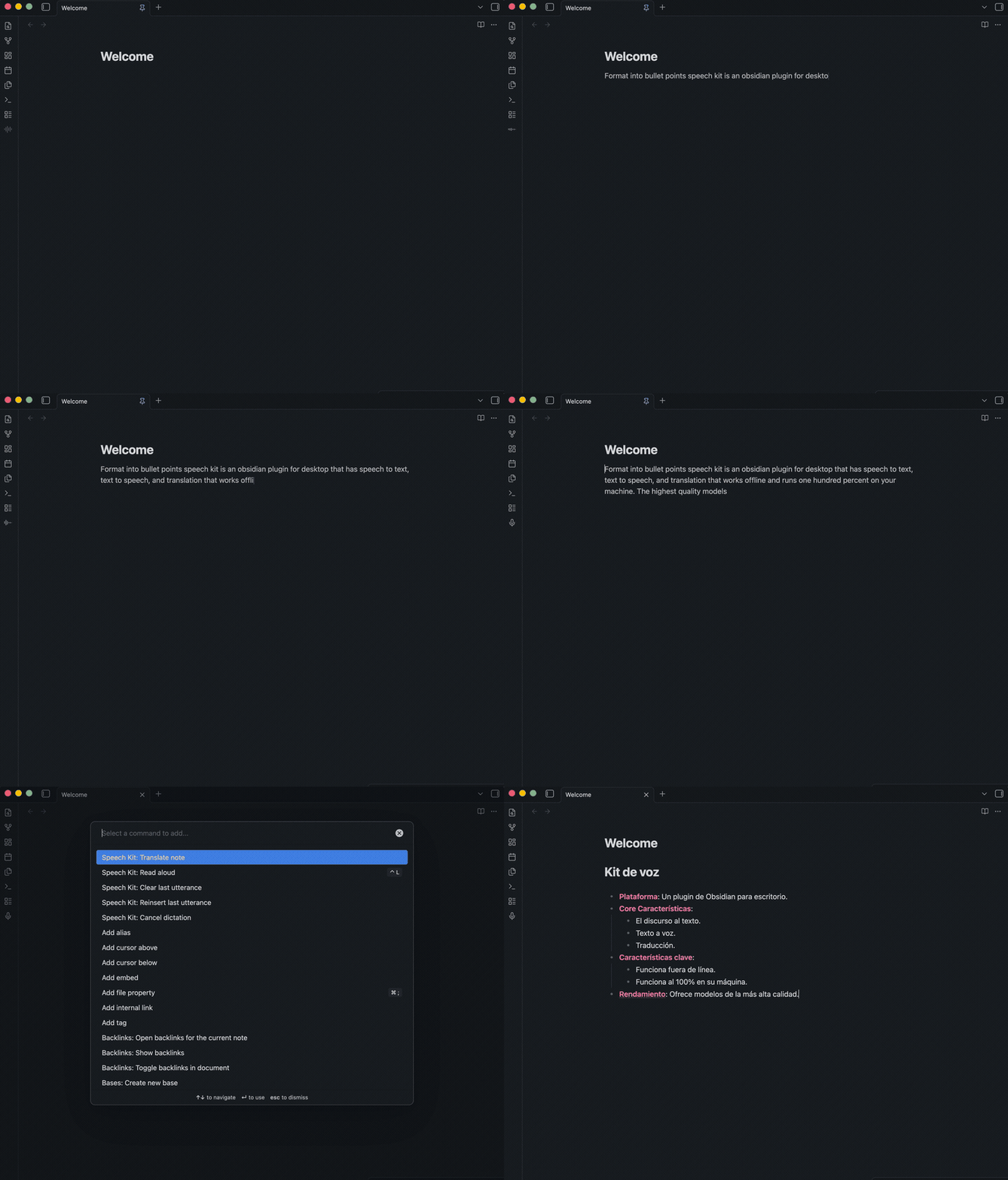
Dictate. Streaming words appear and revise in place while you speak. Finished text lands as Markdown at your cursor. Switch to a batch model when accuracy after each pause matters more than immediacy.
Transcribe files. Run Transcribe local audio file to turn an audio or video recording into text in the current note. Speech Kit extracts the audio with its media decoder and transcribes it with an installed batch speech model. Choose a language, model, timestamps, speaker labels, and paragraph style for that job. Your media stays on your computer.
Import YouTube captions. Run Transcribe YouTube video, paste a video link, and add its available captions to the current note. Choose the caption language and optional linked timestamps. This fast path needs an internet connection, but no speech model or video download. Videos without usable captions leave the note unchanged.
Both commands can optionally run one of your AI presets on the complete transcript. AI is separate from transcription; if you choose a remote provider, transcript text is sent to that provider. See the media transcription guide for setup and options.
Translate. Translate a selection or a whole note between English and seven other languages. Preview the result before replacing your text, inserting it into the note, or copying it. One local model pack covers every supported direction.
Listen. Read any note aloud with natural local voices. Control the voice, speed, and playback without leaving Obsidian.
Refine. Optional LLM tools can clean up, summarize, restructure, or transform text with your own prompts.
One toolkit across platforms
Many speech apps are limited to one operating system, one model, or one part of the workflow. Speech Kit brings the same toolkit to macOS, Windows, and Linux, with hardware acceleration and system-audio capture where available.
| Platform | Architecture | Acceleration | System audio |
|---|---|---|---|
| macOS | Apple silicon | Metal for Whisper | macOS 14.2 or later |
| Windows | x86-64, ARM64 (Snapdragon 8cx or newer) | Optional NVIDIA CUDA (x86-64 only) | Supported |
| Linux | x86-64, ARM64 glibc (ARMv8.2 or newer, e.g. Raspberry Pi 5) | Optional NVIDIA CUDA (x86-64 only) | PulseAudio or PipeWire |
Choose your platform. Choose your models. Keep one workflow inside Obsidian.
Getting started
- Install Speech Kit from Community Plugins.
- Follow the setup wizard to install the native engine and a speech model.
- Select Try dictation now, or start from the ribbon, command palette, or a hotkey.
Dictation, local file transcription, translation, and read aloud require no account, API key, usage credits, or cloud service. Once their models are installed, they continue working offline. YouTube caption import requires a connection to YouTube.
Optional LLM text tools are separate. You can connect a local or remote provider when you choose to use them.
Language support
Each feature is served by a different model, so coverage is tracked per feature rather than as a single list.
| Language | Transcription | Live dictation | Read aloud | Translation | Interface |
|---|---|---|---|---|---|
| English, Spanish, German, French, Portuguese, Italian, Dutch, Japanese | ✅ | ✅ | ✅ | ✅ | ✅ |
| Croatian | ✅ | ✅ | ✅ | — | ✅ |
| Serbian | ✅ | — | — | — | — |
✅ supported · — not yet available
Transcription coverage also depends on the model you select: multilingual models cover the full set above, while some smaller or specialized models are English-only. Translation runs through English in either direction, so every supported pair has English on one side.
Local-first, private by default
Speech Kit works without accounts, subscriptions, or required cloud services.
- Your media stays on your machine. Dictation, local file transcription, read aloud, and translation run locally and continue working offline once their models are installed. YouTube caption import retrieves text from YouTube without downloading the video.
- No account, telemetry, or metered usage. No API key, credit card, subscription, or usage credits to monitor.
- LLM tools are optional. Add flexible language processing to your workflow using a local model or a remote provider you choose. Text leaves your device only when you explicitly use a remote provider, and audio is never uploaded.
- Choose what works for you. Install high-quality models suited to your language, hardware, and workflow.
- Transparent and open. Downloads are explicit, third-party licenses are documented, and Speech Kit is open source.
Support development
If Speech Kit is useful to you, please support development:

Development and project links
Speech Kit pairs a TypeScript plugin with a Rust native sidecar. See CONTRIBUTING.md for its architecture, setup, and development workflow.
Community Plugin · Latest release
Third-party component and model licenses are documented in THIRD_PARTY_NOTICES.md and shown before model download.